Introduction
Annotated genome files contain a lot of information, but they are hard to read as raw text. Coordinates, feature types, strand direction, and conserved regions are all present, yet the overall structure remains difficult to inspect. This task wraps pyGenomeViz, a Python package for comparative genomics built on matplotlib, to turn annotated genomes into an interactive HTML view that is much easier to explore. pyGenomeViz supports GenBank and GFF inputs and can visualize genomic features as well as sequence-similarity links between multiple genomes. (GitHub)
In this wrapper, the task is designed to cover two common situations. First, you may want to visualize one annotated file simply to inspect the positions and organization of its features. Second, you may want to compare multiple genomes to reveal conserved regions or homologous CDS/protein features. To keep the interface simple, the task exposes a single high-level mode selector and handles the underlying pyGenomeViz workflow internally. (GitHub)
When the task is used in visualization_only mode, it reads one file or a folder of files and plots the annotated features track by track. When it is used in genome_comparison mode, it relies on pyGenomeViz’s MUMmer-based comparative workflow to visualize whole-genome similarity links. When it is used in cds_protein_homology mode, it relies on pyGenomeViz’s MMseqs-based workflow to visualize homologous CDS features between genomes. pyGenomeViz officially provides CLI workflows for BLAST, MUMmer, MMseqs, and progressiveMauve comparison result visualization.
🧰 Prerequisites
Access to Constellab and a valid Digital Lab environment.
Installed bricks: gws_omix ≥ 0.13.13
A supported annotated genome input:
- a single file, or
- a folder containing one or more supported files.
Supported file formats:
- GenBank:
.gb, .gbk, .genbank, .gbff - GFF/GFF3:
.gff, .gff3
For comparison modes, note the distinction between formats:
- GenBank can support both visualization and comparison workflows because it includes sequence plus annotation.
- GFF/GFF3 is supported for visualization of annotated feature positions, but not for MUMmer or MMseqs comparison in this wrapper because plain GFF does not provide the required sequence data by itself. pyGenomeViz exposes GenBank utilities such as
write_genome_fasta() and write_cds_fasta(), which reflects this difference between genome-level and CDS-level workflows.
🧪 Workflow: Step by Step
1. Add the required task: Comparative Genome Visualization
This task performs either annotation visualization or comparative genome visualization depending on the selected mode and the input content. It uses pyGenomeViz as the rendering engine.
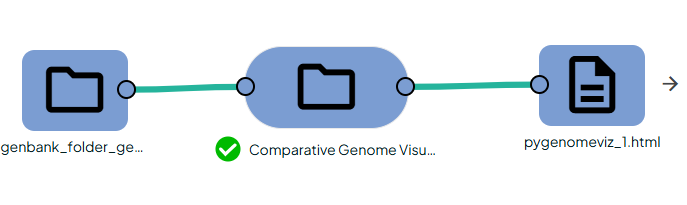
2. Configure the task
Provide genome_input.
The task accepts:
- a single GenBank or GFF/GFF3 file, or
- a folder containing one or more supported files.
Then select comparison_mode:
visualization_only: Display annotations only. This mode is intended for inspecting genomic features and their positions without running sequence comparison.
genome_comparison : Compare whole genomes. In this wrapper, this mode uses MUMmer behind the scenes and is intended for structural genome comparison, conserved blocks, and large similarity links between annotated genomes. MUMmer is designed for rapid alignment of large DNA sequences, including whole genomes.
cds_protein_homology : Compare homologous CDS/protein features. In this wrapper, this mode uses MMseqs2 behind the scenes and is intended for CDS/protein homology links between genomes. The official pyGenomeViz MMseqs workflow is specifically described as visualization of homologous CDSs using the MMseqs RBH method.
3. Run the task
The task scans the input path, keeps supported files, and applies the following logic:
- If the input contains any GFF/GFF3 file, the task automatically switches to visualization_only, even if a comparison mode was requested.
- If the input is a single file, the task can visualize it directly.
- If the input is a folder of multiple GenBank files, the task can either visualize them or compare them depending on the selected mode.
- If comparison is requested but fewer than 2 GenBank files are available, comparison cannot be performed.
This behavior is intentional: GFF is sufficient for plotting feature positions, but comparison workflows require sequence-aware GenBank inputs. pyGenomeViz’s own GenBank API exposes sequence-oriented utilities such as genome FASTA and CDS FASTA export, which is why comparison modes are reserved for GenBank input in this wrapper.
Outputs
💡 Information
What is shown in visualization_only mode ?
This wrapper focuses on common annotation features such as:
- CDS
- gene
- mRNA
- exon
- rRNA
- tRNA
- tmRNA
- ncRNA
These feature types are plotted from the input annotations whenever they are available. pyGenomeViz examples and plot tips show the same general style of feature-track rendering from GenBank or GFF annotation data.
Why GFF is visualization-only here ?
A GFF file describes annotated feature coordinates and attributes, which is enough to draw tracks and feature positions. However, MUMmer and MMseqs comparison workflows need actual sequence data. Since plain GFF does not embed the underlying genome sequence in the same way a GenBank record does, this wrapper does not attempt MUMmer or MMseqs comparison from GFF input. pyGenomeViz’s comparison workflows are documented around GenBank-based genome comparison pipelines.
When to choose genome_comparison ?
Choose genome_comparison when you want a global structural view:
- conserved regions across genomes
- large similarity ribbons
- rearrangements or inversions
- whole-genome organization
This mode is the right fit for large-scale genome-to-genome comparison and is powered by the pyGenomeViz MUMmer workflow. MUMmer is designed for large DNA sequence alignment, including whole genomes. (GitHub)
When to choose cds_protein_homology ?
Choose cds_protein_homology when your main goal is to connect homologous coding features:
- CDS correspondences
- protein homology
- coding-region similarity across genomes
This mode is the right fit for feature-level homology rather than whole-genome structure and is powered by the pyGenomeViz MMseqs workflow.
Difference from MSA tools such as MAFFT
This task is not a multiple-sequence-alignment viewer. MSA tools align a selected set of homologous sequences residue by residue, which is useful for detailed family-level inspection. By contrast, pyGenomeViz comparison workflows focus on genome-scale or feature-scale similarity visualization between annotated genomes. pyGenomeViz’s official comparison CLI workflows are based on BLAST, MUMmer, MMseqs, and progressiveMauve, not MAFFT. (GitHub)